Mighty Brush: A Bold Display Font for Web Design
In the fast-paced world of digital product creation, typography is often the deciding factor between a user bouncing off a page and converting into a loyal customer. As web designers and UI specialists, we constantly search for typefaces that do more than just display text; they need to convey emotion, establish hierarchy, and guide the eye through complex layouts. Mighty Brush emerges as a standout choice in this crowded space, offering a vibrant and bold aesthetic that bridges the gap between raw urban energy and polished design sophistication.
This is not merely another script font lost in a sea of generic handwritten options. Mighty Brush is a carefully crafted display font that combines attractive curves with a fresh, modern edge. For designers building landing pages, online stores, or brand-focused web experiences, understanding how to leverage this specific typeface can significantly elevate the visual impact of your projects.
Defining the Visual Personality
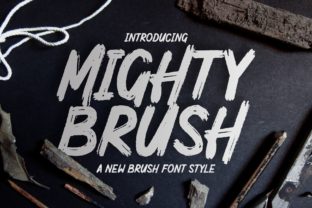
When evaluating a new addition to your font library, the first step is understanding its inherent character. Mighty Brush delivers a stylish script that feels alive. It possesses a dynamic rhythm, characterized by thick strokes and fluid connections that mimic the natural movement of a broad-tip brush. However, unlike traditional calligraphy which can feel stiff or overly formal, this typeface injects a contemporary, urban vibe.
The "bold" aspect of its description is crucial for digital interfaces. In web design, thin lines often disappear on lower-resolution screens or get lost against busy background images. Mighty Brush maintains its integrity across various sizes, ensuring that your headlines remain legible and impactful. This makes it an ideal candidate for hero sections where immediate visual engagement is required. The font’s personality is confident and approachable, making it perfect for brands that want to appear authentic yet professional.
Strategic Placement in Digital Layouts
Knowing when to use a display font is just as important as knowing how it looks. Because Mighty Brush is highly decorative, it should be used sparingly to maintain its power. Overusing a script font can lead to visual fatigue and reduced readability. Here is how you can strategically integrate it into your web designs:
- Hero Headers: Use Mighty Brush for the main headline on a landing page. Its large x-height and bold weight ensure it captures attention immediately above the fold.
- Call-to-Action Areas: While not suitable for small button text due to complexity, it works wonderfully for larger CTA banners or section dividers that urge users to take action.
- Brand Logos: For creative entrepreneurs, coaches, or boutique owners, this font can serve as the primary logotype, establishing a memorable brand identity from the first click.
- Short Phrases and Accents: Use it for pull quotes, testimonial highlights, or decorative elements that break up long blocks of sans serif body copy.
Avoid using Mighty Brush for long-form content, navigation menus, or footer information. These areas require high legibility and neutrality, which are better served by clean sans serif or serif fonts. The goal is to create a visual hierarchy where Mighty Brush acts as the anchor, drawing the eye to key messages while supporting typography handles the informational heavy lifting.
Enhancing Readability and User Experience
Readability in web design is not just about letter recognition; it is about scanning behavior. Users rarely read every word on a webpage; they scan for headings and key points. A strong display font like Mighty Brush aids this process by creating distinct visual landmarks. When paired correctly, it helps users navigate the content structure intuitively.
However, mobile responsiveness presents unique challenges. On smaller screens, intricate script details can blur together. To mitigate this, increase the line height and letter spacing slightly when using Mighty Brush on mobile devices. Ensure there is sufficient contrast between the text and the background. While it performs well on light backgrounds, it also stands out effectively against dark modes, provided the color contrast meets accessibility standards. Avoid placing this font over highly textured images unless you use a solid overlay or text shadow to preserve clarity.
Mastering Font Pairing for Brand Identity
The true test of a display font is how well it plays with others. Mighty Brush demands a partner that is understated and functional. The most effective pairing strategy involves combining it with a geometric sans serif font for body copy. This contrast creates a modern, editorial look that feels both trendy and trustworthy.
For example, if you are designing a course sales page, use Mighty Brush for the module titles and key benefits, then switch to a clean sans serif for the detailed curriculum descriptions. If you are building a portfolio site for a photographer, pair it with a minimalistic serif font to add a touch of elegance and sophistication. The key is balance. Let Mighty Brush provide the emotional hook, while the secondary font ensures the message is delivered clearly and professionally.
Practical Applications Across Industries
Different digital products require different tonal approaches. Here is how Mighty Brush adapts to various niches:
- Boutique Online Stores: Use it for category headers or sale banners to create a sense of urgency and style without feeling cheap.
- Coaching and Consulting Websites: It adds a personal, human touch to otherwise corporate layouts, helping to build trust and connection with potential clients.
- Creative Portfolios: It serves as an excellent tool for designers and artists to showcase their name or project titles, reinforcing their creative expertise.
- Digital Ads and Social Graphics: Its bold nature makes it highly effective in static banners where space is limited and impact must be immediate.
Technical Considerations and Licensing
Before implementing Mighty Brush into your next project, review the technical specifications. Check for included styles, such as regular, bold, or italic variants, although display scripts often rely on a single strong weight. Ensure the file formats include webfonts (WOFF/WOFF2) for optimal loading speeds on websites. Slow-loading fonts can hurt SEO and user experience, so optimization is key.
Additionally, verify multilingual support if your target audience is global. Not all script fonts support extended character sets, so confirm that the glyphs you need are included. Finally, always respect commercial font licensing. Whether you are using it for a client’s website, a digital template, or your own online store, ensure your license covers web usage and the expected traffic volume. Proper licensing protects your work and supports the creators who develop these essential design assets.
Incorporating Mighty Brush into your toolkit offers more than just aesthetic appeal; it provides a strategic advantage in communicating brand tone and guiding user interaction. By understanding its strengths and limitations, you can create digital experiences that are not only visually striking but also functionally superior.